Documentation Index

Fetch the complete documentation index at: https://docs.kodeflowstudios.com/llms.txt

Use this file to discover all available pages before exploring further.

Branch Nodes are nodes that you can use to create loops and create if statements inside the dialogue file itself without needing to make logic with code.

Set Flags

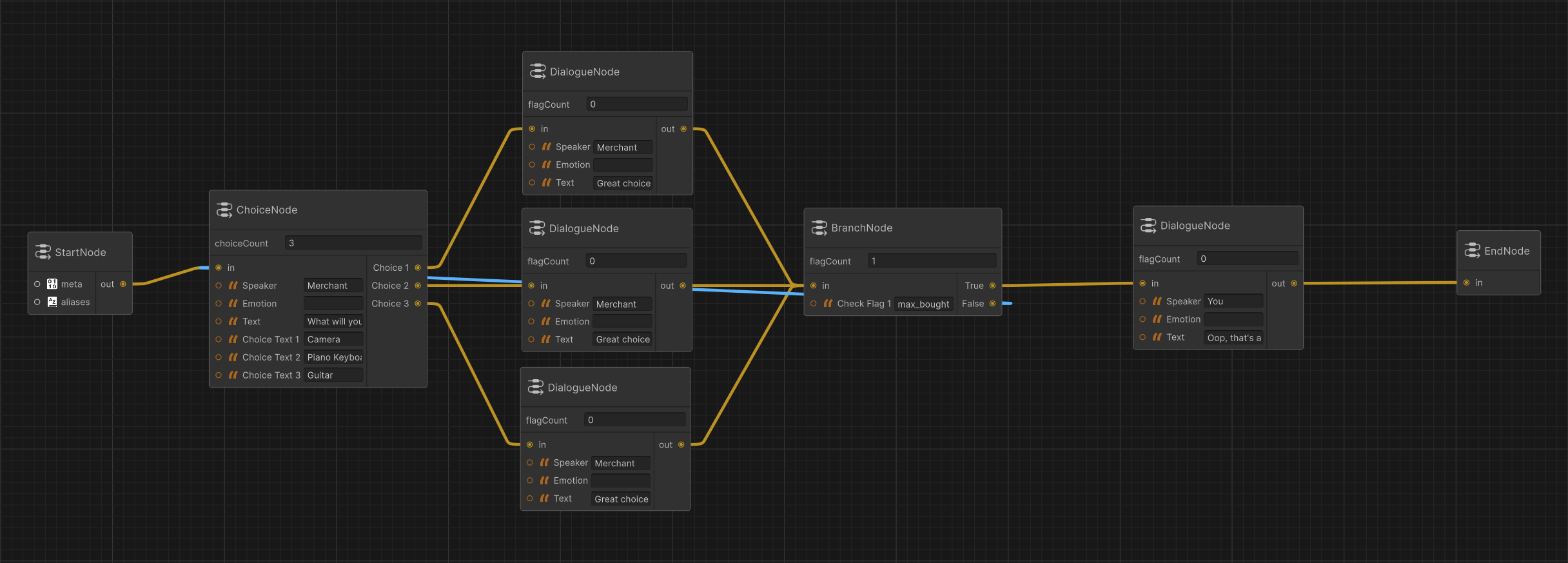
Another way could be to set some flags through code like bought two items out of a three item pool:
start:
  Speaker: "Merchant"
  Text: "What will you buy?"
  Choices:
    - Text: "Camera"
      NextNode: node_camera
    - Text: "Piano Keyboard"
      NextNode: node_piano
    - Text: "Guitar"
      NextNode: node_guitar
node_camera:
  Speaker: "Merchant"
  Text: "Great choice! That'll be $300."
  SetFlags:
    - bought_item
  NextNode: can_buy
node_piano:
  Speaker: "Merchant"
  Text: "Great choice! That'll be $500."
  SetFlags:
    - bought_item
node_guitar:
  Speaker: "Merchant"
  Text: "Great choice! That'll be $200."
  SetFlags:
    - bought_item
can_buy:
  CheckFlags:
    - max_bought
  TrueNode: node_done
  FalseNode: start
node_done:
  Speaker: "You"
  Text: "Oop, that's all I can afford for now! Thanks for your service."
And the code for it would look something like:
int totalItems = 0;

if (parleyYaml.Flags.IsFlagSet("bought_item"))
{
    totalItems++;
    parleyYaml.Flags.ClearFlag("bought_item");
}

if (totalItems >= 2)
{
    parleyYaml.Flags.SetFlag("max_bought");
}
For more info on Flags, check FlagHandler.

Loops

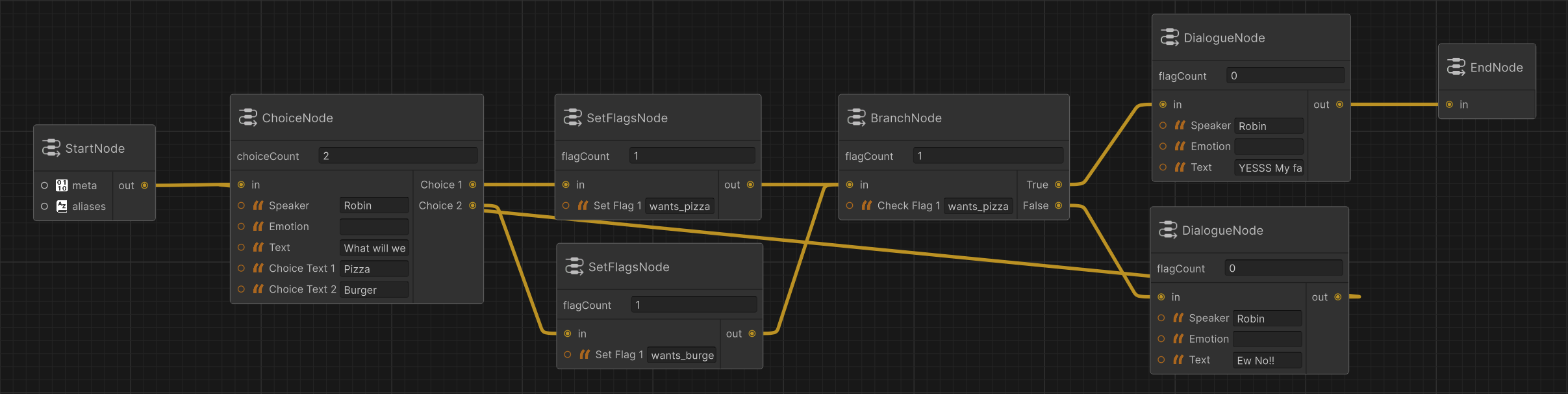
You can create a loop in your dialogue using a branch node by having it keep rechecking a flag until it is true, here are several ways you can use this:
node_1:
  Speaker: "Robin"
  Text: "What will we eat today?"
  Choices:
    - Text: "Pizza"
      NextNode: node_2
    - Text: "Burger"
      SetFlags: # can be used either way, in choice or in node.
        - wants_burger
      NextNode: node_4
node_2:
  SetFlags:
    - wants_pizza
node_3:
  CheckFlags:
    - wants_pizza
  TrueNode: node_5
  FalseNode: node_4
node_4:
  Speaker: "Robin"
  Text: "Ew No!!"
  NextNode: node_1
node_5:
  Speaker: "Robin"
  Text: "YESSS My favourite!"

Item Validation

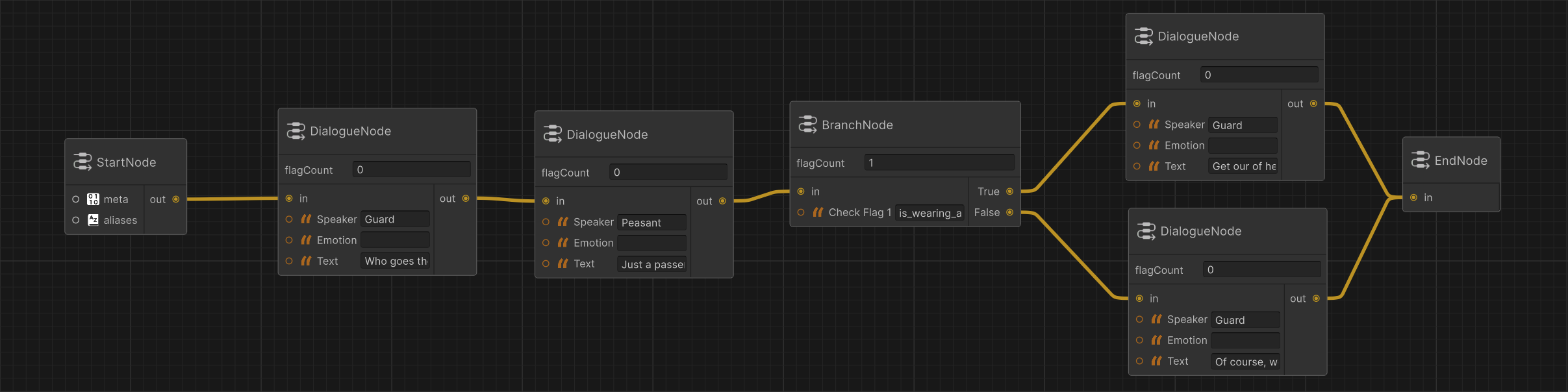
You could also have a person keep saying something or an action keep getting repeated if for example the player is missing an item!
node_1:
  Speaker: "Guard"
  Text: "Who goes there!"
  NextNode: node_2
node_2:
  Speaker: "Peasant"
  Text: "Just a passer by, I need to get into the caslte."
  NextNode: armour_check
armour_check:
  CheckFlags:
    - is_wearing_armour
  TrueNode: node_3
  FalseNode: node_4
node_3:
  Speaker: "Guard"
  Text: "Get our of hear before I put your head on a stick!"
node_4:
  Speaker: "Guard"
  Text: "Of course, welcome back. His majesty was looking for you."
And the code would be a simple SetFlag("is_wearing_armour") before running the dialgoue.

Hanging Dialogue

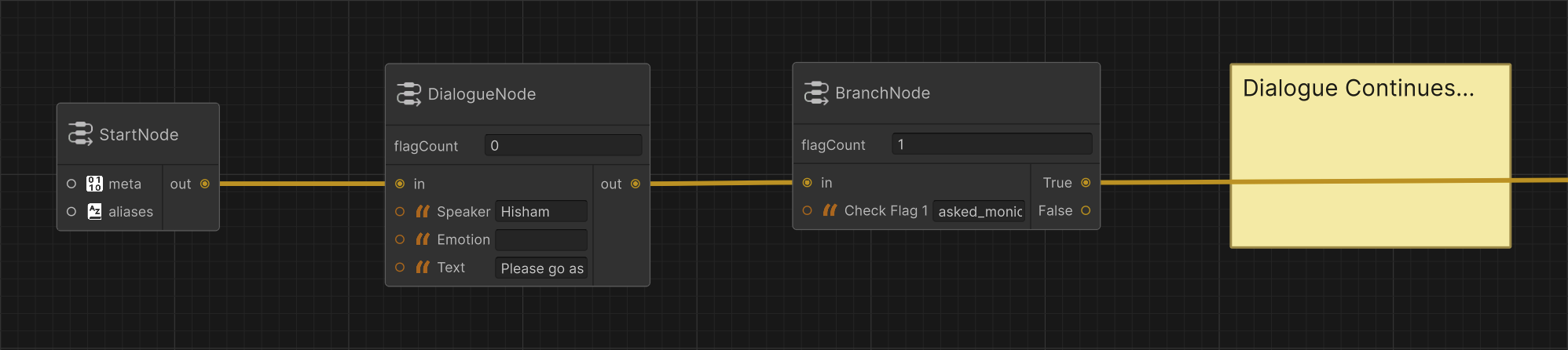
You could also make a dialogue hang until something happens, instead of quitting the dialogue, simply set a flag that would hide the UI, and have the player do something. For example we could make a character refuse to continue a dialogue before the player talks to another character.
node_5:
  Speaker: "Hisham"
  Text: "Please go ask Monica first.."
  NextNode: ask_check
ask_check:
  CheckFlags:
    - asked_monica
  TrueNode: node_6
  FalseNode: node_5
node_6:
  # dialogue continues
And the code would only need to call SetFlag("asked_monica") when the player interacts with the character named Monica, then hiding the UI.As you can see, while the building blocks are simple by design, they open a lot of possibilites and allow for some fairly versatile options.For more info on branch nodes, see Reference: Branch Node.